
Never MissImportantSlack Messages Again
remindo tracks unanswered Slack messages and sends you timely reminders, so no important communication gets lost ⏰
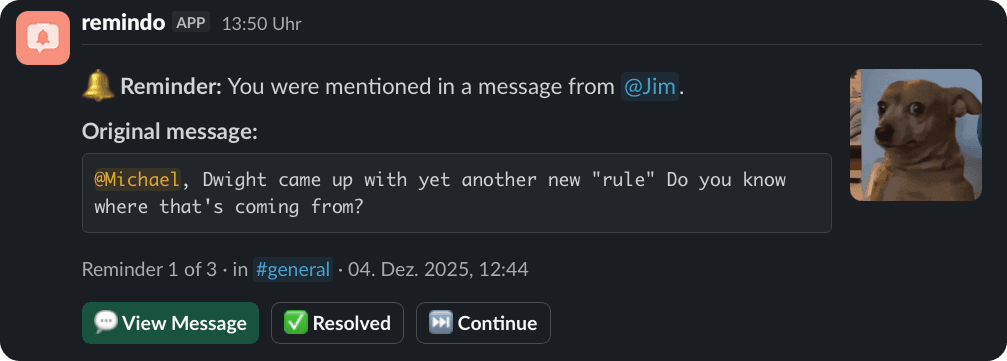
Get a follow-up when your mentions or questions go unanswered
HOW IT WORKS
Up and running in seconds
Install remindo
Add remindo to your Slack workspace with one click. No complicated setup, no configuration required. It works right out of the box.
Configure your preferences
Open the remindo Home Tab in Slack to set your working hours, reminder intervals, and which types of messages to track.
Invite remindo to your channels
Add remindo to the channels you want to monitor. From that moment on every unanswered question, @mention, or follow-up gets tracked automatically.
How it works
Nothing gets lost

remindo sends you a direct message in Slack. No new app, no new tab.
FEATURES
Everything You Need to Stay on Top of Messages
Never Miss a Key Message
Get a follow-up when your mentions or questions go unanswered.
Suits to your Workflow
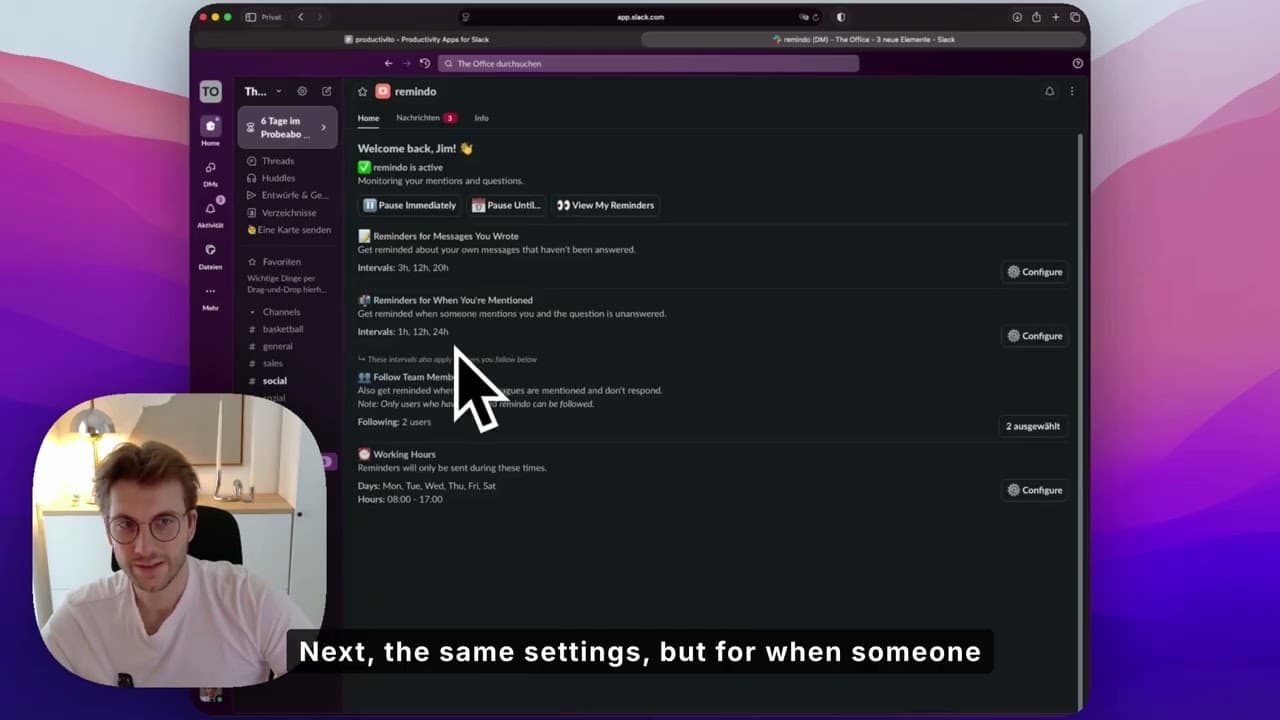
Configure intervals and settings in the Home Tab to fit your specific needs.
Your Follow-up Dashboard
See all pending questions and mentions at a glance.
Proactive Team Support
Follow colleagues and get notified when they are mentioned but haven't replied
Respect Your Downtime
Configure working hours so you're not disturbed off the clock.
Full Control, when You Need It
Pause reminders indefinitely for deep work, or set a resume date for vacation.

“I built remindo because I spent years watching important questions disappear into busy Slack channels, including my own. The answer was always the same: nobody thought to follow up.”
Mats Ramsl
Founder, remindo
And it's not just us
 Hundreds of Reddit posts about this exact problem
 r/Slackr/Slackr/Slackr/Slackr/Slackr/Slackr/Slackr/Slackr/Slackr/Slack
Pricing
One price.
No tiers. No surprises.
Fair, transparent pricing.
per user / month
- Unlimited reminders
- Detects questions, mentions & follow-ups
- Works across all channels and threads
- Configurable working hours
- 14-day free trial included
- Priority support
€0.00 due today · No credit card required
WHY REMINDO
Built for the problem, not the workaround
/remind
| Slack /remind | Stars / Bookmarks | remindo | |
|---|---|---|---|
| Works automatically | – | – | ✓ |
| Detects questions & mentions | – | – | ✓ |
| Reminds you when no reply | – | – | ✓ |
| Team support (follow colleagues) | – | – | ✓ |
| No setup required | – | ✓ | ✓ |
| Dashboard of open items | – | – | ✓ |
SEE IT IN ACTION
Watch how remindo works
See how easy it is to set up and use remindo in your Slack workspace
FREQUENTLY ASKED QUESTIONS
Got Questions? We've Got Answers
You can — but /remind requires you to manually set a reminder for each message, and only if you remember to do it in the first place. remindo works automatically: it detects questions and @mentions on its own and creates reminders without any action from you. It's the difference between setting an alarm and having someone tap you on the shoulder.
No. Messages in your own DMs or 1:1 conversations are ignored. Reminders are only created in channels where remindo is a member.
Yes. remindo automatically detects your Slack timezone. If you change your timezone, remindo adjusts all scheduling as soon as you open the Home tab again.
Your new working hours apply instantly. All future reminders always respect your most recent working-hour configuration.
No. While paused indefinitely, remindo suppresses all reminder deliveries. Only reminders scheduled after resuming will reach you.
Yes. When your pause ends, remindo delivers a consolidated set of all missed reminders at the next available moment inside your working hours.
Editing affects reminders. Removing a question mark cancels the existing reminder; adding a question mark creates a new reminder. The same applies for adding or removing @mentions.
The reminder is immediately cancelled as soon as the original message is deleted.
Not always. remindo works based on clear message patterns like question marks, @mentions, and supported follow-up flows. If a message does not match one of those patterns, no reminder may be created for it.
No. Resolution depends on the reminder type. Author reminders require the mentioned user's reaction, mention reminders require your reaction, and following reminders resolve via you or the followed user.
No. remindo works for threaded and unthreaded messages, but thread replies resolve reminders most reliably.